Core Branching Model

Branching Model & Workflows

A clean, battle-tested implementation of Vincent Driessen's Git Flow model. Create, publish, synchronize, and finish branches without touching the terminal.

The Five Core Branch Types

GitFlow Helper establishes strict separation of concerns between production stability and rapid feature development.

Production main / master

Main Branch

Represents official production releases. Every commit to main is tagged with a release version (e.g. v2.10.0). Developers never commit directly to main; code only arrives via completed releases or urgent hotfixes.

Direct commits protected: Yes 🛡️
Integration develop

Develop Branch

The central integration trunk for continuous development. Contains the latest tested features awaiting the next release cycle. All new features branch off develop and merge back into develop.

Direct commits protected: Yes 🛡️
Daily Work feature/*

Feature Branches

Isolated spaces where developers implement new user stories or enhancements. Branched off develop. GitFlow Helper can bind them directly to Jira, GitHub, GitLab, or Redmine tasks.

Finish target: develop (Merge / Squash / MR)
Stabilization release/* & hotfix/*

Release & Hotfix Branches

Releases: Forked from develop for final polish, QA bugfixes, and version bumping. Merges into both main and develop.
Hotfixes: Forked straight from main for production emergencies. Also merges to both branches with patch tag.

Finish target: main + develop + Auto-tag
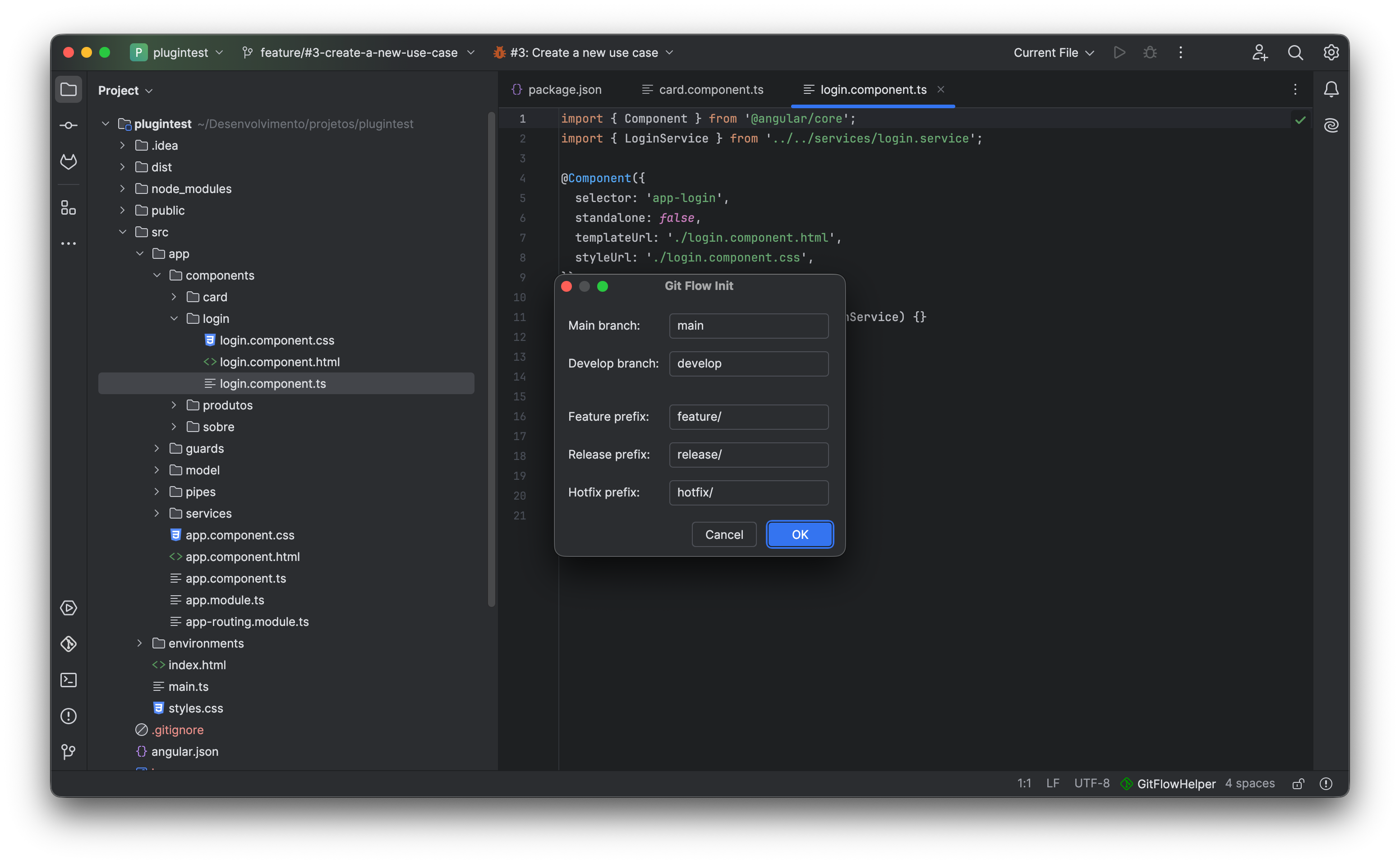
⚙️ gitflow-init-dialog.png
Screenshot Placeholder: GitFlow Initialization Dialog
Place the screenshot showing the initial setup dialog where branch naming conventions (main, develop, feature/, release/, hotfix/, tag prefix) are configured.
Recommended Resolution: 1100 × 650 px • PNG
One-click repository initialization with customizable branch prefix conventions GitFlow Init Action

The Feature Lifecycle

From issue assignment to pull request approval, every step is streamlined.

1

Feature Start

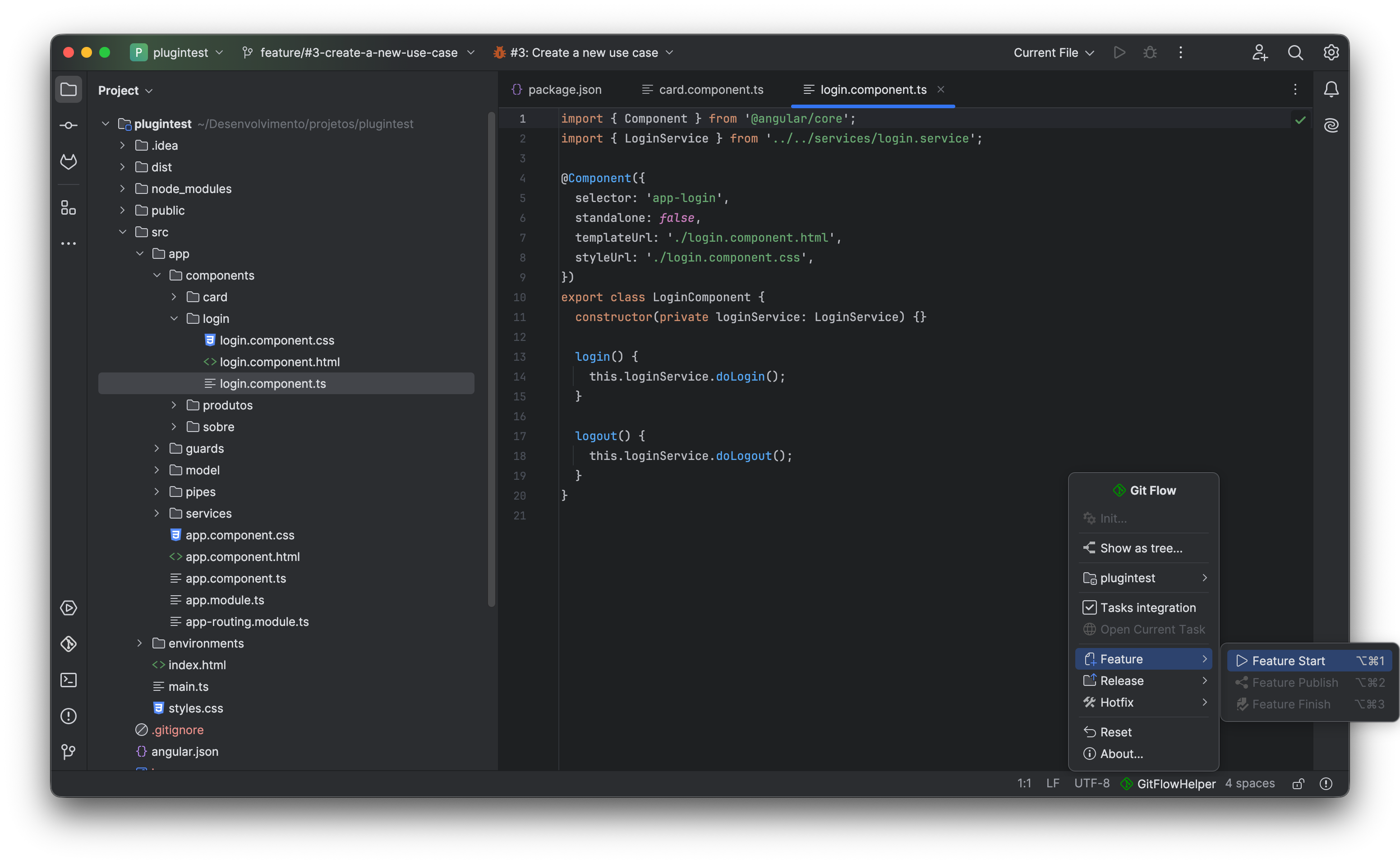
Select Feature Start (or Ctrl+Alt+1). Optionally pick an assigned issue from Jira, GitHub, GitLab, or Redmine. GitFlow Helper automatically normalizes the ticket key and summary into a valid branch name (e.g. feature/PROJ-123-dark-mode) and transitions the issue status.

2

Feature Publish

Share your progress with team members. Feature Publish (Ctrl+Alt+2) pushes the branch upstream to remote origin and sets tracking in a single background operation.

3

Feature Finish

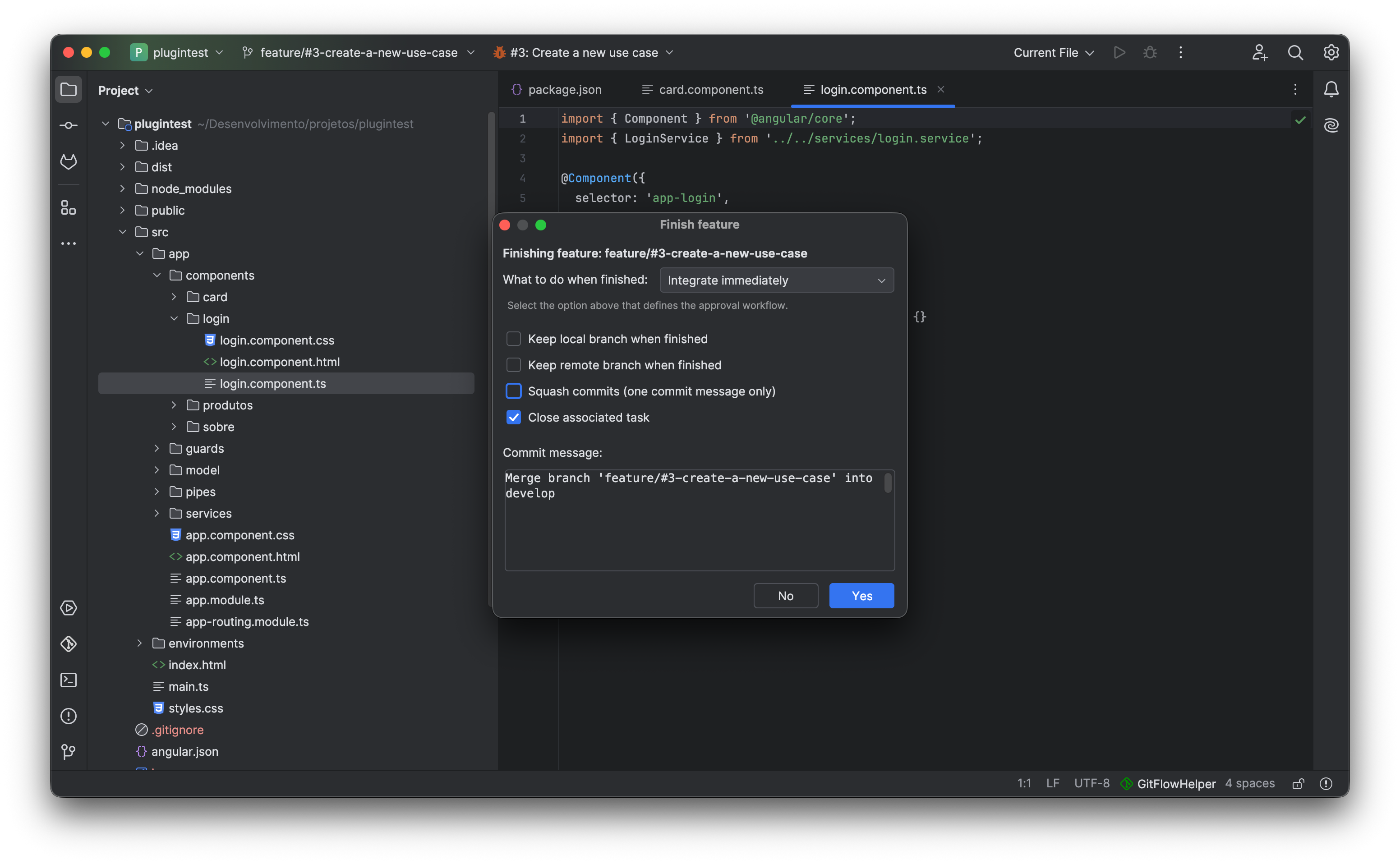
Complete your work with tailored options:
• Integrate Immediately (--no-ff or squash)
• Create GitLab MR via Git push options
• Self-Create PR on GitHub / Bitbucket
• Automatically closes linked issue tracker task!

🚀 gitflow-new-feature-dialog.png
Screenshot Placeholder: Feature Start & Task Assignment
Place the screenshot showing the Feature Start dialog with active task dropdown list, branch name preview, and optional task binding checkboxes.
Recommended Resolution: 1100 × 650 px • PNG
Automatic branch name generation linked with issue tracking systems Shortcut: Ctrl + Alt + 1

Proactive Divergence Indicator & 1-Click Sync

Long-lived feature branches easily become stale. GitFlow Helper ensures you know the second your branch falls behind develop.

⬇

Real-Time Status Bar Badge

Whenever other team members merge code into develop, an interactive status badge appears automatically in your IDE status bar displaying ⬇ N (where N is the exact count of commits behind).

  • ✓ Instant 1-Click Sync: Click the badge or trigger Feature Sync to fetch and rebase/merge develop cleanly into your working branch.
  • ✓ Continuous Background Watcher: Evaluates branch status on project updates, IDE window focus, and background sync sweeps.
  • ✓ Pre-Finish Blocker: Prevents finishing branches that are behind develop, requiring developers to resolve potential merge conflicts locally first.
⚡ status-bar-divergence-badge.png
⬇
Screenshot Placeholder: Status Bar Divergence Badge
Place the zoomed screenshot of the IDE status bar displaying the ⬇ 4 badge and the 1-click sync tooltip action.
Recommended Resolution: 800 × 400 px • PNG
Proactive divergence awareness right inside IntelliJ status bar Divergence: ⬇ N Commits
🎯 gitflow-finish-feature-dialog.png
Screenshot Placeholder: Finish Feature Workflow Options
Place the screenshot showing the Finish Feature dialog with options for immediate merge, squash commit, GitLab Merge Request generation, and branch cleanup.
Recommended Resolution: 1100 × 650 px • PNG
Support for multiple review and merge paradigms (Direct Merge, Squash, GitLab MR, Self-create) GitFlow Finish Action
💖 Support Open Source

Find These Workflows Helpful?

GitFlow Helper is continually refined and updated with new features and IDE compatibility. Show your appreciation by supporting the creator on Ko-fi!